
General Electric monogramGE Heritage Village
GE Heritage Village bulb logo

GE STEM Lab · Student course

Computers & How Stuff Works

Build a four-bit unsigned number and explain how on/off signals can carry information.

Original imagined learning zone · AI-assisted concept art, not a real GE facility.

Labeled system diagram · Computers & How Stuff Works
0101CPUInstructionsResult1234Data pathways · not physical chip layout
  1. 1

    Input

    A sensor or user supplies data encoded as bits.

  2. 2

    CPU

    Fetches, decodes and executes program instructions.

  3. 3

    Memory

    Stores instructions and data used by the processor.

  4. 4

    Output

    A display or actuator presents or acts on the result.

Original simplified teaching schematic—not to scale, an installation guide, a historical artifact or a complete technical blueprint.

COMPUTER SCIENCE · WORKED PRACTICAL

How stuff works · inside the CPU

CPU means central processing unit. The control unit coordinates instructions, the ALU performs arithmetic and logic, and registers hold immediate values. RAM holds active programs and data; secondary storage retains files. Cache is small fast memory near the processor. Address, data and control buses carry different information.

Fetch

PC points to the next instruction. Its address is copied to MAR; memory supplies the instruction through MDR into CIR. PC advances to the next instruction.

PC: 0 → 1 · MAR: 0 · MDR/CIR: ADD 7, 5

Simplified instruction trace, not a real processor emulator. PC: program counter; MAR: memory address register; MDR: memory data register; CIR: current instruction register; ACC: accumulator. Modern CPUs overlap operations.

HowStuffWorks is independent general-interest further reading, not an official syllabus or village partner.

📡 HALL COURSE · 4 COMPLETE LESSONS

Computers & How Stuff Works · learning syllabus

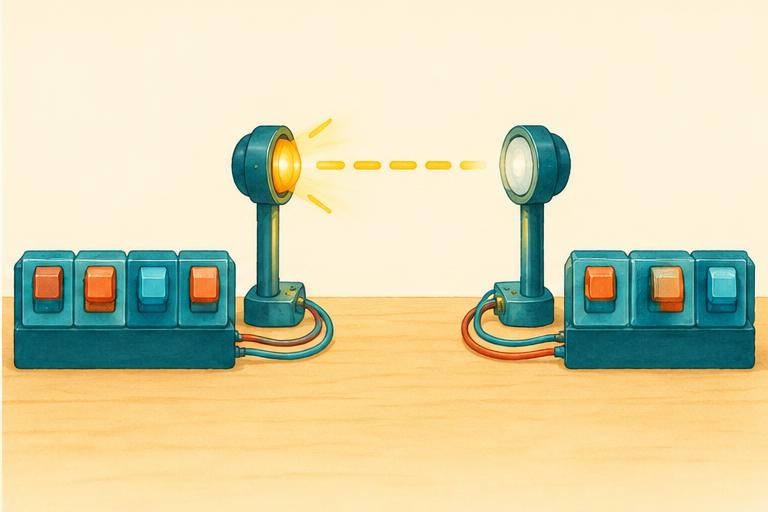
Build a four-bit unsigned number and explain how on/off signals can carry information. Digital engineers encode information, transmit signals and decode messages.

Suggested 100 minutes · foundation explanations → worked examples → interactive experiments

Computer Science · Data representation · 20 suggested minutes

01 · Binary numbers and data representation

Learning objective: Convert unsigned binary values and explain bits and bytes.

A bit has two possible values, 0 or 1. An unsigned binary number uses powers of two as place values. In four bits these are 8, 4, 2 and 1. A byte contains eight bits. With n bits there are 2ⁿ distinct patterns; an unsigned n-bit integer ranges from 0 to 2ⁿ − 1.

The pattern 1010 represents ten when interpreted as an unsigned binary number. The same stored pattern can have a different meaning under a different encoding. Text requires a character encoding; images use representations of pixels and colour; sound can be sampled and quantised. A computer needs conventions, not merely flashing lights.

Adding binary numbers uses carrying just as decimal does, but each column carries at two rather than ten. A result outside the available number of bits causes overflow in a fixed-width unsigned representation. The virtual four-bit sender shows only unsigned place value; it does not implement encryption or all computer data types.

Worked example · follow the reasoning

1010₂ = 1×8 + 0×4 + 1×2 + 0×1 = 10. Eight bits provide 256 patterns, representing unsigned values 0–255.

Common misconception

Four bits represent sixteen different values, not a maximum unsigned value of sixteen.
Computer Science · Computer architecture · 25 suggested minutes

02 · How a computer follows instructions

Learning objective: Explain CPU, memory and the fetch–decode–execute model.

A processor executes machine instructions. In a conceptual fetch–decode–execute cycle, it fetches an instruction from memory, decodes its operation and carries it out. Registers hold small amounts of data used immediately. The arithmetic and logic unit performs arithmetic and logical operations; the control unit coordinates instruction execution.

RAM stores data and instructions currently in use and is usually volatile: contents are lost when power is removed. Secondary storage keeps files for later use. Storage capacity is different from processing speed. A program loaded from storage can use RAM while the processor executes instructions; it does not make the CPU “remember” as a person does.

Real processors overlap operations, use caches and have complex designs, so the simple cycle is a teaching model. Explain input, processing, output and storage using a familiar task such as adding two numbers. An operating system manages resources and provides services for applications. Programs and hardware are different parts of the system.

Worked example · follow the reasoning

For a simple program “read A; read B; add; display”, inputs are two numbers, processing is addition and output is the sum. If A = 7 and B = 5, the output is 12.

Common misconception

A bigger storage drive does not by itself mean a faster processor.

Computer Science · Data transmission · 25 suggested minutes

03 · Networks, packets and error detection

Learning objective: Describe packet-based communication and distinguish error detection from encryption.

A network connects devices so they can exchange data. Data may be split into packets containing payload and control information, such as destination and sequence information. Packets can take different paths and must be arranged appropriately at the receiver. Bandwidth is a rate capacity, not the same as how long one message takes to arrive.

Noise or faults can change transmitted bits. Error-detection methods add information so some changes can be noticed. In even parity, the added parity bit makes the total number of 1 bits even. It detects any odd number of bit flips, but can miss an even number. Acknowledgements and retransmission can help recover from detected errors.

Encryption addresses confidentiality by transforming data under a scheme and key. It is not the same purpose as a parity check. Safe digital behaviour also includes trusted updates, careful access controls and avoiding disclosure of personal data. This hall’s light-signal activity is a representation exercise, not a secure communications system.

Worked example · follow the reasoning

Data 1011 has three 1s. For even parity, add a parity bit 1 so the total is four. If one bit flips, parity becomes odd and the check notices a problem. Two flips may preserve even parity.

Common misconception

A checksum or parity bit is not encryption, and encryption alone is not a guarantee of correct transmission.

Computer Science · Multimedia representation · 30 suggested minutes

04 · Images, sound and storage calculations

Learning objective: Calculate simplified raw data size and evaluate sampling trade-offs.

A bitmap image represents a grid of pixels. Each pixel’s value encodes colour under an agreed format. Resolution refers to the pixel grid or sampling detail, while colour depth is bits per pixel. For an uncompressed simplified image, raw data size in bits = width × height × bits per pixel. Real files also contain metadata and may use compression.

Digital sound records samples of a changing signal. Sample rate is samples per second and bit depth controls the number of quantisation levels. For a simplified uncompressed recording, size in bits = sample rate × bit depth × duration × channels. More samples or more bits require more storage; they do not automatically improve poor source material.

Lossless compression allows exact recovery of the encoded data; lossy compression discards some information to reduce size. Choose a representation according to purpose and constraints. A medical system, a text document and a shared music clip can have different requirements. Keep units clear and distinguish bits from bytes.

Worked example · follow the reasoning

A 100 × 50 bitmap at 8 bits per pixel needs 40000 bits = 5000 bytes of raw pixel data. Headers and compression are excluded.

Common misconception

A file’s actual size is not always its raw pixel size because formats add information or compress it.

VISUAL SCIENCE NOTEBOOK

Computers & How Stuff Works · how the system works

Process 1 · Input → Output
01Input
02Memory + CPU
03Instruction execution
04Output
Process 2 · Data encoding → Decoded data
01Data encoding
02Packets + channel
03Error checks
04Decoded data
Process 3 · Pixels → Divide by 8 → bytes
01Pixels
02Bits per pixel
03Total bits
04Divide by 8 → bytes

Process icons are conceptual symbols. Arrows show a selected energy, information or reasoning pathway—not scale, physical component positions or a complete engineering schematic. Use the lesson text and sources for the assumptions.

WATCH · PAUSE · EXPLAIN

Educational video lessons

CrashCourse

Representing Numbers and Letters with Binary: Crash Course Computer Science #4

CrashCourse · metadata checked November 8, 2026

Base-two place values and character encoding.

Watch on YouTube

Third-party lessons, not GE Heritage Village productions or partnerships. Loading a player connects to YouTube; external videos may contain advertising or become unavailable. Metadata checks identify the selected video, not certification of every statement. Original lesson sources remain the reference for calculations.

Young scientists · ages 8–12 with an adult

Computers & How Stuff Works

Digital engineers encode information, transmit signals and decode messages.

Original educational illustration: Computers & How Stuff Works

Original AI-assisted educational illustration · numbered concept markers, not exact component locations or a technical blueprint.

A sender represents information as a signal, such as on/off light pulses.

Send a secret light signal

8

4

2

1

0000 = 0

Unsigned integers 0–15. A conceptual transmission; nothing is sent outside this page.

The science behind it

Binary place value uses powers of two. Information needs an agreed encoding to have meaning.

A conceptual four-bit code, not encrypted communication or a real optical network.

How things work · exploration library

Computing

How a CPU follows instructions

A processor follows machine instructions that operate on data. Conceptually, it fetches an instruction, decodes it and performs an operation. Modern processors overlap many operations, but an instruction set still defines what the machine can do. A CPU is not a tiny person making decisions.

Original explanation. For evidence and further reading, open the corresponding hall’s science references.

Science tutor

AI can make mistakes; check the lesson’s sources. Don’t share personal information. This conversation is not saved and disappears when you leave the page.

What would you like to understand about this science hall?

Original teaching materials and AI-assisted concept pictures. Selected IGCSE-style topics and engineering enrichment, not a complete accredited examination course. Volunteer education project, not official GE.

References & further reading

Selected syllabus references

Original British IGCSE-style lessons based on selected subject areas, not a complete exam course, official mapping of every objective, or Cambridge-endorsed material. Core/Supplement and Core/Extended requirements vary. MRI reconstruction, turbine cycles and specialist engineering are application enrichment beyond the underlying school topics. Check the current official syllabus for examination requirements. Video metadata identifies third-party lessons; it does not certify every spoken claim or license downloads.